Adaptive Video Streaming Explained: How Netflix Streams One Chunk at a Time

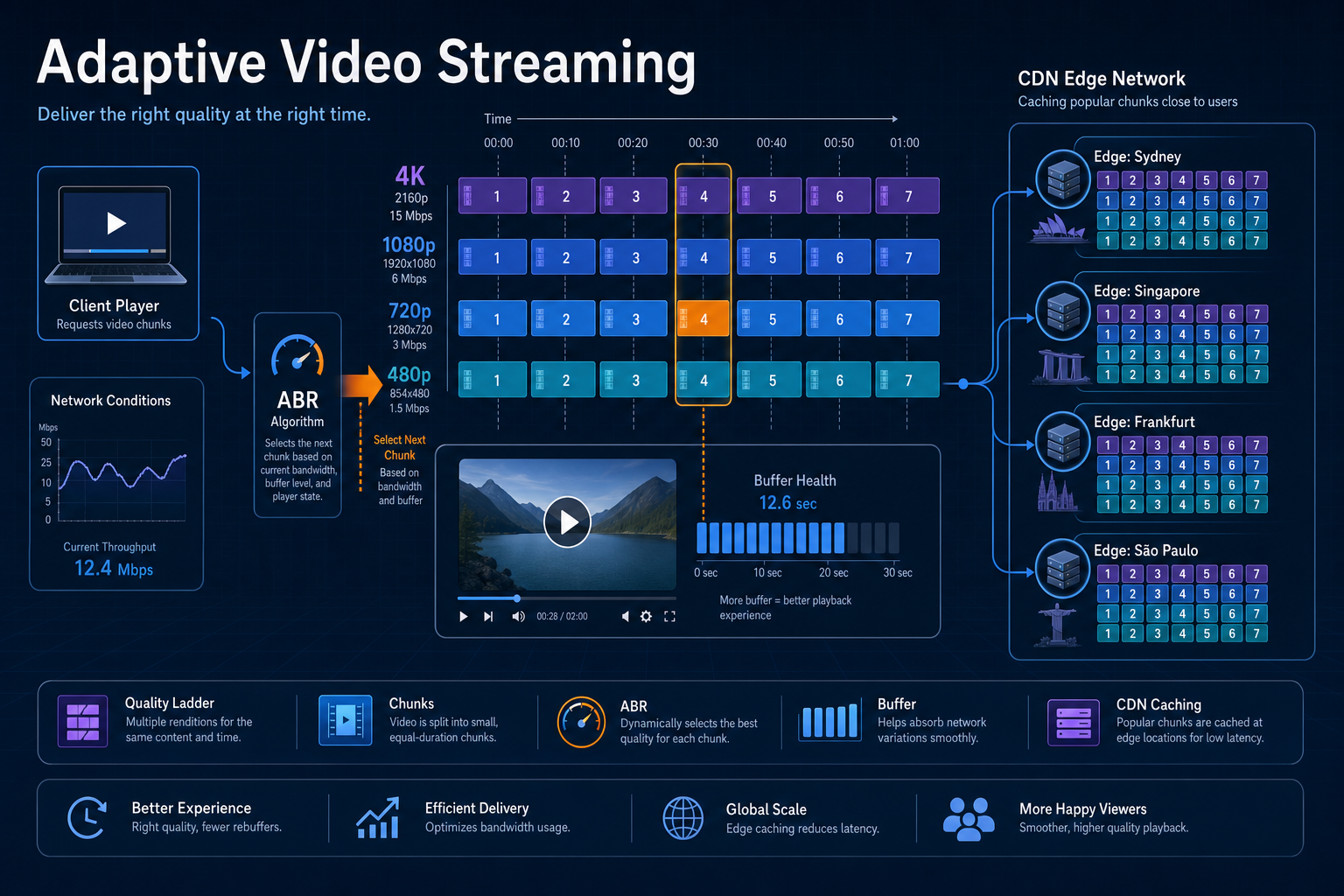
When you watch Netflix, picture quality can rise or fall without stopping playback. That is not magic. It is architecture.
Netflix does not stream one large video file. It streams thousands of tiny segments while the player continuously adapts to your network. This explainer walks that design: why one-file download fails, how chunks and quality ladders work, what a manifest is, how ABR chooses the next segment, and why buffering, seeking, and CDN caching all depend on independent objects.
Adaptive streaming is not "download the movie." It is a loop that repeatedly answers: which version of the next few seconds can I fetch before my buffer runs out? Chunks, ladders, manifests, and edge caches exist so that question stays cheap and continuous.
The bottom line first
- One big file fails at startup, seek, and mid-stream network change.
- Segments (~few seconds) are the unit of request, cache, and quality switch.
- Aligned ladders (4K / 1080p / 720p / …) share the same timeline; only bitrate changes.
- Manifest lists rungs, codecs, durations, and chunk URLs before play starts.
- ABR picks the next chunk from measured bandwidth, latency, loss, and buffer.
- CDN caches chunks as objects; popular segments win edge storage. See CDN Under the Hood.
Traditional video download
Imagine downloading an entire movie as one file.
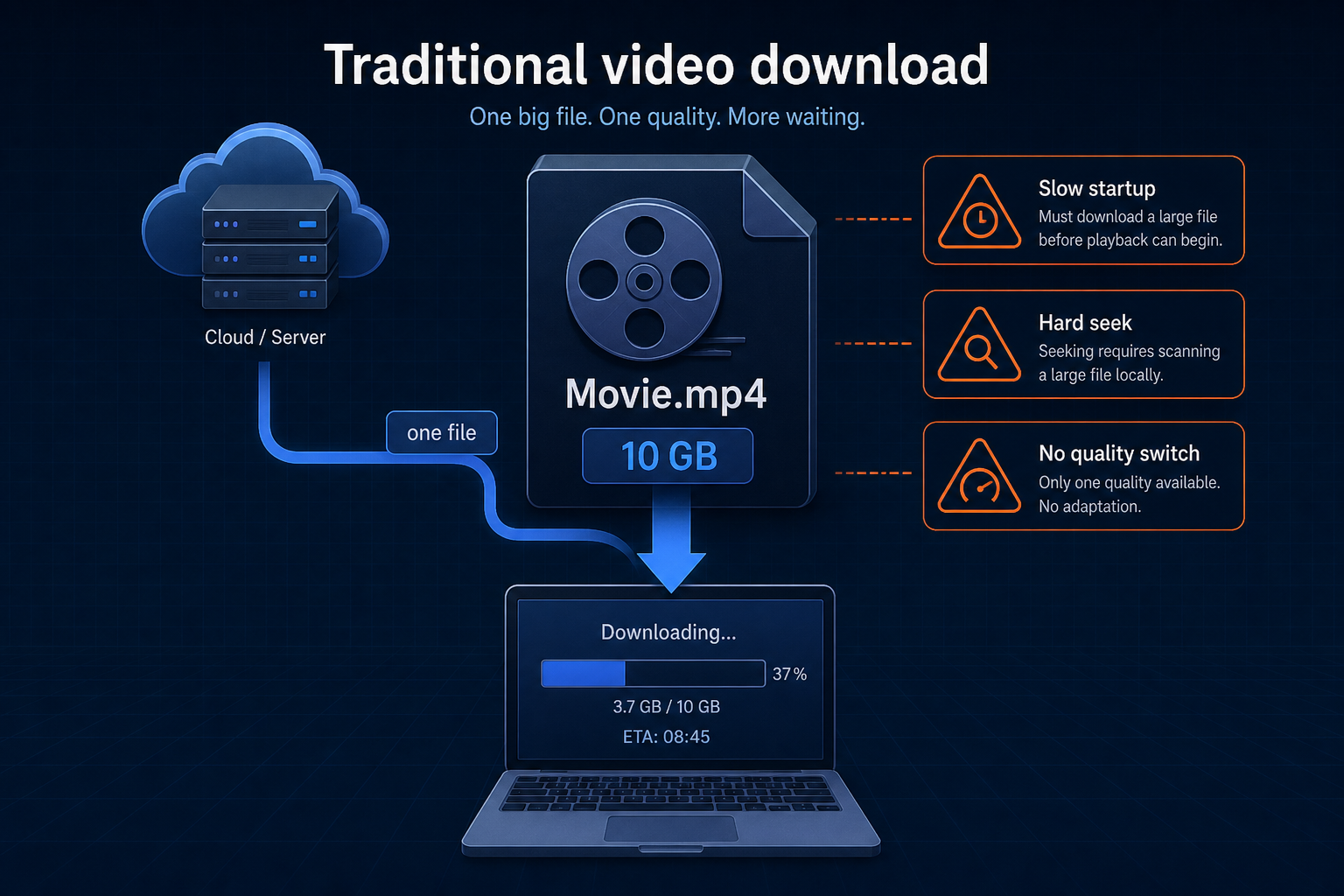
Problems include:
- Slow startup (wait for a large prefix, or the whole file)
- Difficult seeking (scan or re-download large ranges)
- Buffering when the network slows mid-transfer
- No way to change quality dynamically without restarting
Modern streaming solves these by changing the unit of transfer from "the title" to "the next few seconds."
A single monolithic file couples startup, seek, quality, and network into one failure mode.
Segment-based streaming
Every encoded version is split into small segments (chunks).
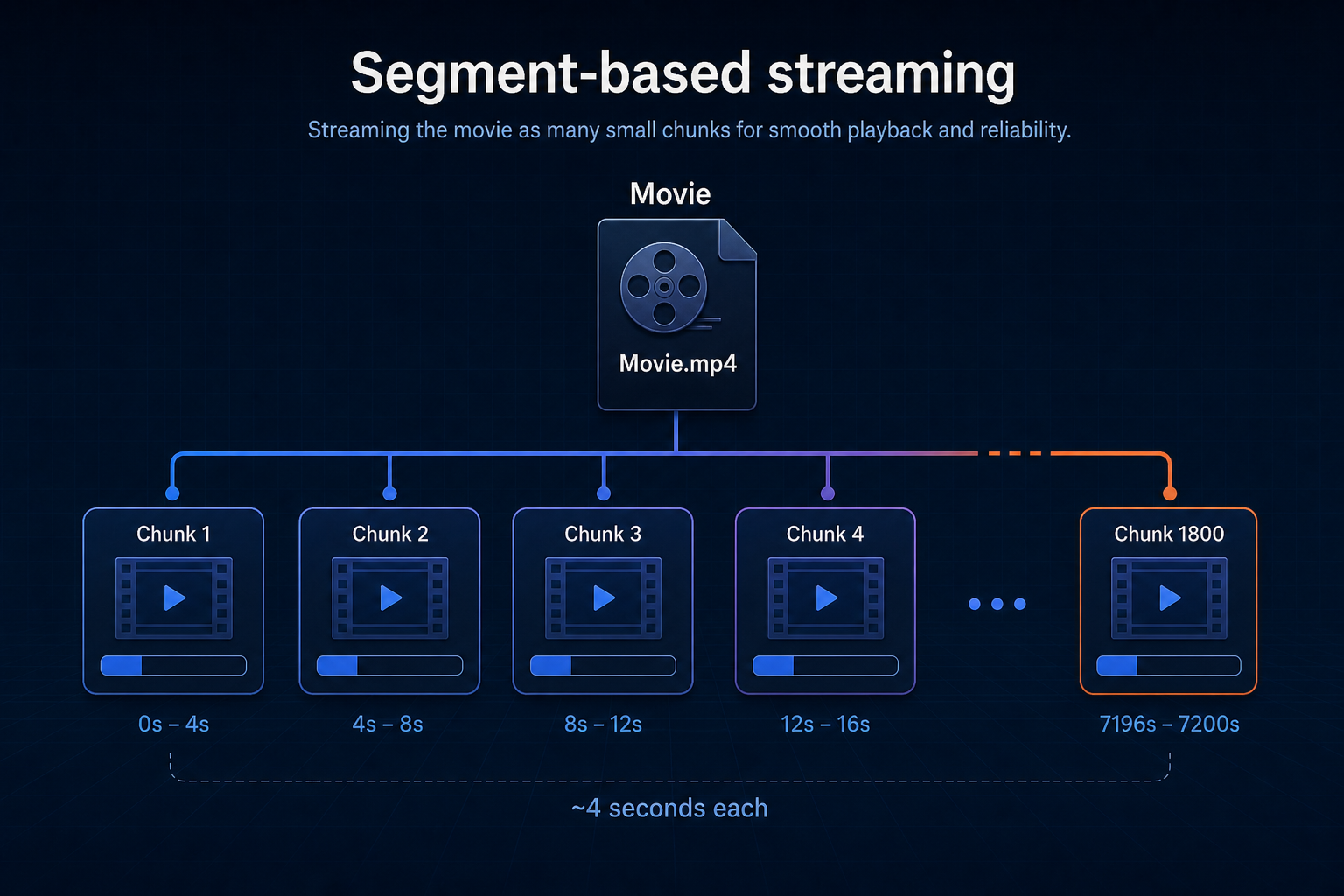
Each chunk typically covers on the order of a few seconds of playback (often around four seconds in teaching examples; real ladders vary by codec and recipe).
Instead of requesting one large file, the player requests one chunk at a time (often several in parallel into a buffer).
The chunk is the atomic unit of streaming: fetch, cache, and switch quality at chunk boundaries.
Multiple quality levels
Netflix (and ABR systems generally) create identical time segments for every resolution on the ladder.
Aligned ladder for the same time windows
0-4 seconds

4K Chunk 1
1080p Chunk 1
720p Chunk 1
480p Chunk 1

4-8 seconds

4K Chunk 2
1080p Chunk 2
720p Chunk 2
480p Chunk 2
Only the quality (bitrate / resolution / codec rung) changes. The playback timeline stays aligned so the player can switch rungs between chunks without jumping in story time.
Ladders are time-aligned menus. Adaptation changes which row you order for the next window, not where you are in the movie.
Manifest file
Before fetching video, the player downloads a manifest (DASH .mpd, HLS playlist, or vendor equivalent).
Simplified manifest shape
Movie.mpd

4K
  Chunk1
  Chunk2
  Chunk3

1080p
  Chunk1
  Chunk2
  Chunk3

720p
  Chunk1
  Chunk2
  Chunk3
The manifest describes:
- Available resolutions / bitrate rungs
- Codecs and other constraints
- Segment duration
- URLs (or URL templates) for every chunk
The player uses that map to decide what is legal to request before ABR decides what to request next.
No manifest, no menu. ABR only chooses among options the manifest declares.
Adaptive bitrate streaming (ABR)
The player continuously measures signals such as:
- Download speed (throughput)
- Latency
- Packet loss / rebuffer risk
- Available buffer (seconds of media already on hand)
It then chooses the best version of the next chunk (sometimes with hysteresis so quality does not thrash).
ABR adapting as bandwidth changes
Bandwidth = 100 Mbps
Request: 4K Chunk 1, 4K Chunk 2, 4K Chunk 3

Bandwidth = 8 Mbps
Request: 1080p Chunk 4, 720p Chunk 5, 720p Chunk 6

Bandwidth = 60 Mbps
Request: 1080p Chunk 7, 4K Chunk 8, 4K Chunk 9
Playback continues because only future chunks change quality. Already-decoded frames in the buffer keep playing.
ABR is a control loop on the next segment, not a one-time "pick a resolution for the whole title."
Buffering
The player stays ahead of the playhead.
Browsers, mobile apps, and TV clients refill that buffer with normal HTTPS GETs of each chunk (HLS/DASH-style). That is HTTP over TLS on TCP (HTTP/1.1 or HTTP/2), not a raw UDP media stream. If the client uses HTTP/3, the app still speaks HTTPS chunk fetches; the wire is QUIC on UDP (reliable), not classic fire-and-forget UDP video. See TCP vs UDP Under the Hood and HTTP vs HTTPS Under the Hood.
Buffer ahead of what you are watching
Watching: 0-4 seconds

Already downloaded:
4-8
8-12
12-16
16-20
20-24
If the network pauses briefly, playback continues from buffered chunks. If the buffer drains faster than fetches refill it, you see a rebuffer. ABR's job is to pick rungs that keep that buffer healthy.
Buffer turns network jitter into a soft problem. Empty buffer turns it into a hard stop.
Seeking
Jump to the one-hour mark. The player does not scan through the movie file.
It maps time → chunk index and requests something like:
Seek as chunk fetch
Chunk 901
Chunk 902
Chunk 903
Playback resumes near-immediately once those segments arrive (plus a short buffer rebuild). That only works because segments are addressable objects on a shared timeline.
Seek is random access into the chunk index, not a linear scan of a 10 GB blob.
CDN caching
Because every chunk is an independent object:
Chunks as cache keys
Chunk 850
Chunk 851
Chunk 852
CDNs can cache only the segments that were requested. Popular titles and popular time ranges (intros, cliffhangers) naturally become widely cached; rarely watched segments consume little edge storage.
That is the same edge hit/miss idea as a general CDN, applied to media objects. Deep dive: CDN Under the Hood.
Chunking makes video CDN-native. One giant file fights the cache; segments fit it.
End-to-end request flow
Same loop as text
User Presses Play
        |
        v
Download Manifest
        |
        v
Measure Network Speed
        |
        v
Select Quality
        |
        v
Download Next Chunk
        |
        v
Add Chunk to Buffer
        |
        v
Repeat every few seconds
The decision repeats continuously throughout playback.
Benefits of chunk-based streaming
| Feature | Benefit |
|---|---|
| Small segments | Fast startup |
| Multiple qualities | Smooth adaptation |
| Buffering | Fewer interruptions |
| Independent chunks | Efficient CDN caching |
| Manifest-driven playback | Device and codec compatibility |
| Chunk boundaries | Seamless quality switching |
Final takeaway
Adaptive streaming combines intelligent encoding, chunking, manifests, and real-time decision making.
Instead of downloading a single movie file, the player repeatedly asks one question:
Which version of the next four seconds can I download before my playback buffer runs out?
By answering that every few seconds, systems like Netflix deliver smooth playback from slow mobile networks to high-speed fiber while minimizing buffering and maximizing quality.
Further reading
Specs and primaries behind chunked ABR: manifests, player APIs, and how large streamers deliver segments over HTTP.
| Topic | Resource | Why read it |
|---|---|---|
| Protocols | HTTP Live Streaming (Apple) | Official HLS overview and authoring entry point |
| Protocols | RFC 8216: HTTP Live Streaming | Wire-level HLS playlist and segment model |
| Protocols | HLS 2nd Edition (draft) | Current HLS evolution (fMP4, LL-HLS, steering) |
| Protocols | DASH Industry Forum | MPEG-DASH interoperability guidelines and tools |
| Protocols | ISO/IEC 23009-1 (MPEG-DASH) | International standard for DASH MPD + segments |
| Players | MDN: Media Source Extensions | How browsers append downloaded chunks into a buffer |
| Players | dash.js | Reference DASH player implementation |
| Players | hls.js | Widely used HLS player for MSE-based browsers |
| Players | Shaka Player | Open player with DASH/HLS and ABR logic |
| Delivery | Open Connect Overview (PDF) | How Netflix pre-positions and serves segment objects |
| Delivery | Open Connect site | Partner-facing CDN program docs |
| Quality | VMAF perceptual metric | Why ladders are judged by eyes, not only bitrate |
| Pipeline | Netflix video pipeline microservices | How encode/package produce the ladders ABR consumes |