TCP vs UDP - Under the Hood
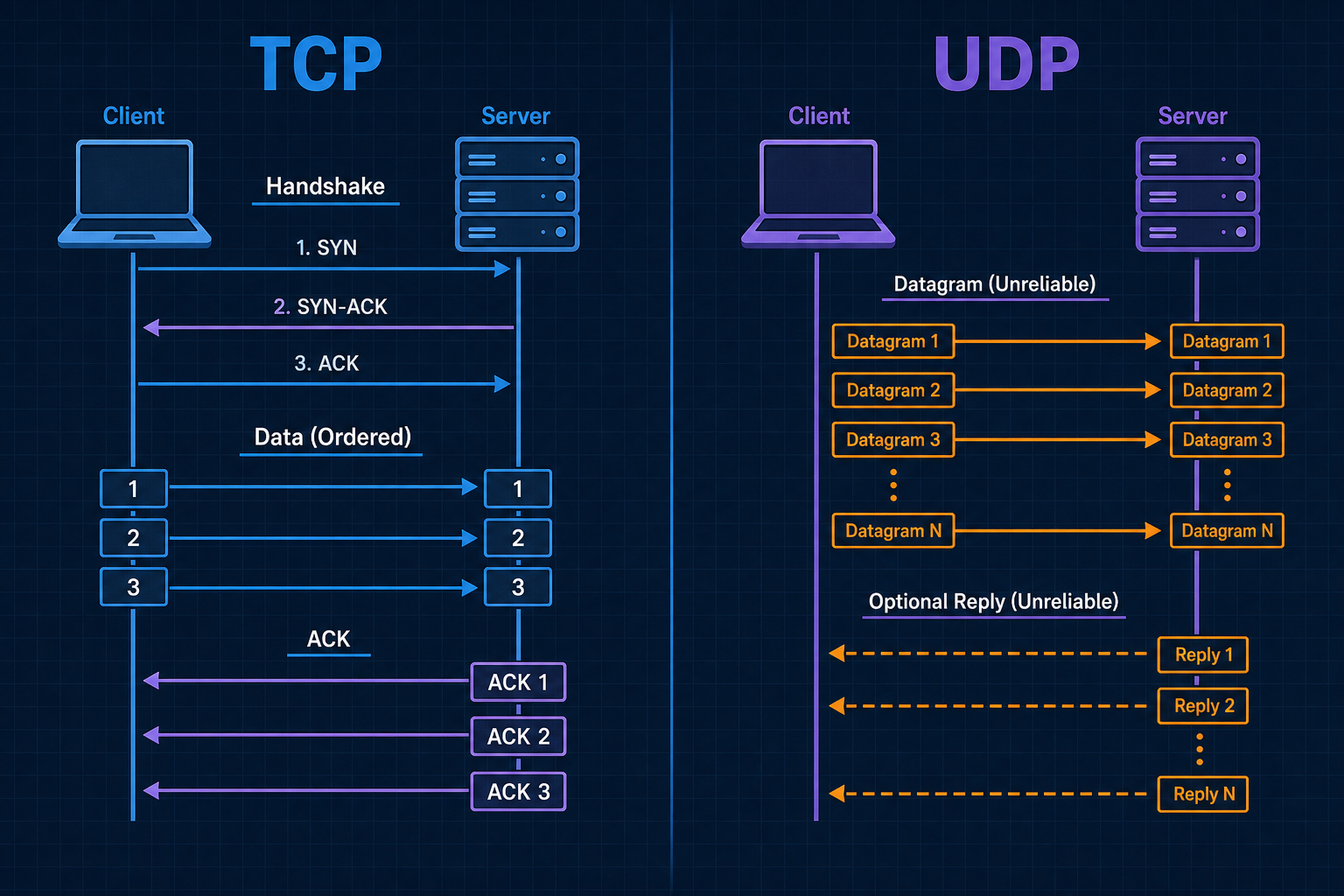
HTTPS feels solid. Live video and classic DNS often gamble on packets that may never arrive. Same Internet. Different transport contracts.
Most engineers know the slogan: TCP is reliable; UDP is fast. That is directionally right. It skips the components, the steps, and the use cases that decide which failures belong to the network versus your app.
TCP gives you an ordered byte stream with retransmission and congestion control. UDP gives you datagrams and almost nothing else. Pick wrong and you either pay latency you did not need, or you reinvent reliability badly.
TCP buys reliability and order with state, handshake cost, and head-of-line blocking. UDP buys simplicity and low overhead; delivery, order, and congestion are your problem (or QUIC’s). Transport choice is an architecture contract, not a default checkbox.
The bottom line first
- TCP: connection-oriented byte stream; handshake, sequence numbers, ACKs, retransmission, congestion control.
- UDP: connectionless datagrams; send and (maybe) receive; no built-in delivery guarantee.
- Both use ports on top of IP so many apps can share one host.
- Reliability is not free: TCP pays RTT and buffers; UDP pushes loss handling into the application or a layer like QUIC.
- Classic use map: web, SSH, databases → TCP; DNS queries, NTP, media, many games, HTTP/3 (QUIC) → UDP.
- Observability differs: TCP shows RSTs, retransmits, window collapse; UDP shows silent drops and app-level timeouts.
What TCP and UDP actually are
Both sit in the transport layer (Layer 4) above IP. IP (Layer 3) delivers packets between hosts. TCP and UDP (Layer 4) deliver data between applications (via ports). Applications such as HTTP and DNS sit above that (Layer 7 in the OSI map people usually mean).
| TCP | UDP | |
|---|---|---|
| Abstraction | Reliable, ordered byte stream | Discrete datagrams |
| Connection | Yes (state on both ends) | No (stateless sends) |
| Delivery | Retransmit until ACK (or give up) | Best effort; loss is silent to the stack |
| Order | In-order delivery to the app | Arrival order not guaranteed |
| Overhead | Higher (headers + state + ACKs) | Lower |
| Congestion | Built-in control | Application / upper layer |
Components involved
| Component | What it is | TCP | UDP |
|---|---|---|---|
| Socket | App endpoint (IP + port + protocol) | Connected after handshake | Bound; send/recv datagrams |
| Port | 16-bit app demux (443, 53, …) | Yes | Yes |
| Segment / datagram | Transport PDU inside an IP packet | TCP segment | UDP datagram |
| Sequence / ACK | Track bytes and confirm delivery | Core | Absent |
| Checksum | Detect corruption | Yes | Yes (often required in practice) |
| Window / buffer | Flow and congestion control | Yes | App manages pacing |
| Firewall / NAT state | Middlebox tracking | Conntrack feels “natural” | Short-lived or UDP timeout quirks |
Port 53 is often DNS over UDP, and sometimes DNS over TCP (large answers, zone transfer). The number names the service habit; the transport still matters.
How a flow works (steps)
TCP is a lifecycle (open → transfer → close). UDP is a send path (optional bind → datagram → hope). Below, each phase is its own section: first what is in the Layer 4 header, then what happens on the wire.
What is a TCP header, and what sits in it
A TCP header is the Layer 4 control block on every TCP segment. It tells the peer which sockets are talking, where this data sits in the byte stream, what the segment means (SYN, ACK, FIN, …), and how much more the receiver can accept. It is not the application message (HTTP, TLS, …). Those bytes, when present, follow in the payload.
So: a TCP segment = TCP header + optional payload. The header is not sent once at connect time. Every segment on the wire carries a TCP header (handshake, data, pure ACK, FIN, RST). Only the payload is sometimes empty.
What sits in that header is the field set below (ports, seq/ack, flags, window, checksum, options).
Header fields (layout)
Think of the header as a fixed control block glued in front of every chunk of (optional) data. On the wire it is laid out in 32-bit rows like this:
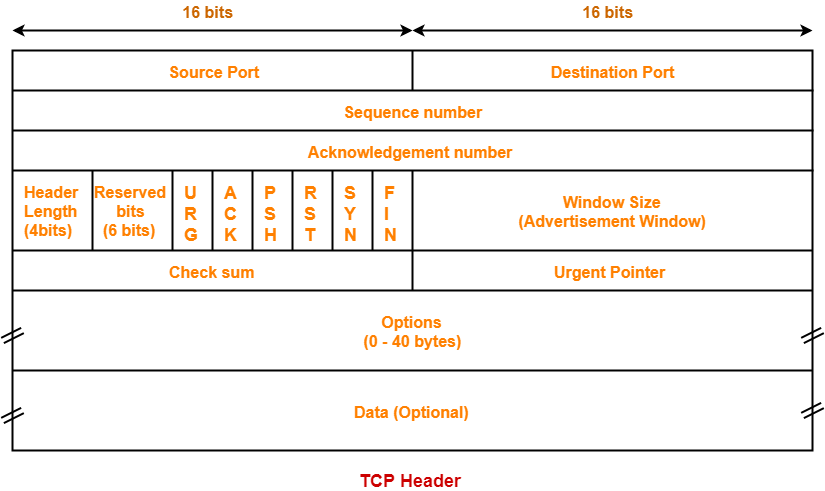
Read it top to bottom: ports (which sockets), then seq / ack (reliability), then flags + window (what this segment means and flow control), then checksum, then optional options and data.
| Field | Bits | Role | Example | When it matters |
|---|---|---|---|---|
| Source port | 16 | Sending socket on the local host. Client usually uses an ephemeral port the OS picks. | Browser open: 53122. Reply from server uses 53122 as dest port. | Demux on the client; NAT maps this port; two tabs = two source ports. |
| Destination port | 16 | Receiving socket on the peer. Servers listen on a well-known port. | HTTPS request: dest 443. SSH: dest 22. Postgres: dest 5432. | Client must target the right service; firewalls filter on this. |
| Sequence # | 32 | Byte offset of this segment's payload in the sender's stream (after the initial SYN seq). | Data segment: seq=1000, length 100 → covers bytes 1000-1099. Next data often seq=1100. | Ordering, reassembly, detecting loss/duplicates. |
| Acknowledgment # | 32 | Next byte the sender of this segment expects from the peer. Valid when ACK flag is set. | Got bytes through 1099 → send ack=1100 ("send me from 1100 onward"). | Cumulative ACK; gaps → dup ACKs → fast retransmit. |
| Flags | 6+ (classic) | Bit switches for what this segment means. Common: SYN, ACK, FIN, RST, PSH, URG. | SYN only = start connect. SYN+ACK = accept. ACK = confirming data/handshake. FIN = done sending. RST = abort. | Handshake, teardown, resets, "push to app now" (PSH). |
| Window | 16 | Flow control: how many more bytes the receiver will accept from the peer (scaled if window-scale option negotiated). | Window 65535 = "you may have up to that much unacked data toward me." Window 0 = "stop; my buffer is full." | Zero-window stalls; slow consumer backs up the sender. |
| Checksum | 16 | Corruption check over header + payload (+ IP pseudo-header). Bad checksum → segment dropped. | Bit flip in flight → receiver discards; TCP retransmits later. You rarely "read" the value in apps. | Silent data corruption protection; bad NIC/path shows as loss. |
| Options | 0-320 | Variable extras after the base header. Common: MSS, window scale, SACK, timestamps. | On SYN: MSS 1460 ("max payload I want"). Later: SACK blocks listing which holes were received. | Tuning throughput, selective retransmit, RTT measurement. |
TCP call start to finish: headers and payloads
Full life of one TCP connection: open → exchange application data → close. Scenario uses plain HTTP on port 80 so payloads are readable. HTTPS is the same TCP header story; the early payloads are TLS binary (ClientHello, …) instead of GET /….
| Client | Server | |
|---|---|---|
| Host | 203.0.113.10 | 198.51.100.20 |
| Port | 53122 (ephemeral) | 80 (HTTP) |
| Teaching ISN | client starts at seq 1000 | server starts at seq 5000 |
Real ISNs are large and random. Lengths below are small for teaching.
A. Open the call (handshake, no app payload)
1. Client → Server: SYN
| Ports | src 53122 → dst 80 |
| Seq / ack | seq=1000 (ISN). Ack unused (ACK flag off) |
| Flags | SYN |
| Options | e.g. MSS 1460 |
| Payload | (empty) |
2. Server → Client: SYN-ACK
| Ports | src 80 → dst 53122 (swapped) |
| Seq / ack | seq=5000 (server ISN), ack=1001 ("got your SYN") |
| Flags | SYN + ACK |
| Payload | (empty) |
3. Client → Server: final handshake ACK
| Ports | src 53122 → dst 80 |
| Seq / ack | seq=1001, ack=5001 |
| Flags | ACK |
| Payload | (empty) |
Connection is ESTABLISHED. Next client data byte is at seq 1001; next server data byte at seq 5001.
B. Application data on the call (header + payload)
4. Client → Server: HTTP request bytes
| Ports | 53122 → 80 |
| Seq / ack | seq=1001, ack=5001, len=45 (covers 1001-1045) |
| Flags | ACK + PSH |
| Payload (example) | see below |
Example request payload (bytes inside TCP)
GET / HTTP/1.1
Host: example.com
Connection: close
TCP does not understand HTTP. It only sees 45 bytes of payload. Next client seq after this segment = 1046.
5. Server → Client: pure ACK (optional alone; often delayed or piggybacked)
| Ports | 80 → 53122 |
| Seq / ack | ack=1046 ("I have client bytes through 1045") |
| Flags | ACK |
| Payload | (empty). Confirms delivery only, not "HTTP 200" |
6. Server → Client: HTTP response bytes
| Ports | 80 → 53122 |
| Seq / ack | seq=5001, ack=1046, len=70 (covers 5001-5070) |
| Flags | ACK + PSH |
| Payload (example) | see below |
Example response payload (bytes inside TCP)
HTTP/1.1 200 OK
Content-Length: 13
Content-Type: text/plain

Hello, world!
Next server seq = 5071.
7. Client → Server: ACK for the response
| Ports | 53122 → 80 |
| Seq / ack | ack=5071 |
| Flags | ACK |
| Payload | (empty) |
C. End the call (teardown, no app payload)
Both sides still use the same ports. FIN consumes one sequence number (like a one-byte "I'm done") even with empty payload.
8. Client → Server: FIN
| Ports | 53122 → 80 |
| Seq / ack | seq=1046, ack=5071 |
| Flags | FIN + ACK |
| Payload | (empty) |
9. Server → Client: ACK of FIN, then server FIN
| ACK of client FIN | ack=1047, flags ACK, payload empty |
| Server FIN | seq=5071, ack=1047, flags FIN+ACK, payload empty |
10. Client → Server: final ACK
| Ports | 53122 → 80 |
| Seq / ack | ack=5072 |
| Flags | ACK |
| Payload | (empty) |
Client enters TIME_WAIT, then the 4-tuple is free. A new call needs a new SYN (often a new ephemeral port).
Header vs payload cheat sheet
| Phase | Header always? | Typical payload |
|---|---|---|
SYN / SYN-ACK / handshake ACK | Yes | Empty |
| App request / response | Yes | HTTP text, TLS records, DB protocol, … |
Pure ACK | Yes | Empty |
FIN / RST | Yes | Empty (RST aborts; no orderly FIN dance) |
HTTPS note: TCP phases are identical. After ESTABLISHED, early payloads are TLS (ClientHello, cert, …), then TLS Application Data wrapping HTTP. Wireshark: TCP flags/seq/ack for lifecycle; TLS/HTTP dissectors for payload. Companions: HTTP vs HTTPS Under the Hood for cleartext vs TLS wrap; HTTPS Encryption Lifecycle Under the Hood for one full call by phase.
Scale note: large bodies split into many segments (≤ MSS); ACKs are frequent; TCP is full duplex. The diagram is the smallest story so headers stay readable.
Reuse: keep-alive skips teardown and sends another data phase on the same ports; a new call needs a new SYN (often a new ephemeral port).
Ports: which apps (sockets) on each host
IP names hosts. Ports pick the socket on that host. Demux uses the 4-tuple (plus protocol = TCP):
source IP · source port · dest IP · dest port
| Side | Typical port | Who chooses it |
|---|---|---|
| Server | Well-known (e.g. 443, 22, 5432) | Service config |
| Client | Ephemeral (e.g. 49152-65535) | OS |
Example: browser 53122 → server 443; reply swaps ports (443 → 53122). Two tabs to the same site get different ephemeral ports = two connections.
SYN is a flag in the header, not a separate header type. Every later data/ACK/FIN segment still carries a full TCP header. A port names a bound socket, not a permanent process.
TCP phase notes (beyond the walkthrough)
| Topic | What to remember |
|---|---|
| Handshake cost | About one RTT before app bytes (TLS adds more after ESTABLISHED) |
| Loss | Retransmit on timeout or duplicate ACKs (fast retransmit) |
| Flow / congestion | Receiver window caps in-flight bytes; sender backs off on loss/delay |
| Head-of-line | A gap can block later bytes from the app even if they arrived |
| Teardown | Orderly FIN/ACK each way; RST aborts. Client often sits in TIME_WAIT briefly so delayed segments cannot corrupt a new 4-tuple |
TCP wire story: header fields drive establish → reliable transfer → close. Incidents are handshake timeout, retransmits, zero window, RST, or TIME_WAIT pressure.
What sits in the UDP header
A UDP datagram = UDP header + payload. Same rule as TCP: the header is on every datagram, not only the first message. There is no separate connect header.
| When | What is sent |
|---|---|
| Every send | Full UDP header + that message's payload |
| Every reply | Its own full UDP header + reply payload |
| Field | Role | Sent when? |
|---|---|---|
| Source port | Reply address for the peer (0 if not used) | Every datagram |
| Dest port | Which listening socket on the target host | Every datagram |
| Length | Header + payload size | Every datagram |
| Checksum | Detect corruption (header + payload + IP pseudo-header) | Every datagram |
Same header, every datagram (phases)
UDP has no handshake or teardown. The header is still on every datagram. Map the story as three app-level phases:
| Phase | Header sent? | Typical payload |
|---|---|---|
| 1 Bind and send | Yes, every datagram | Request bytes (DNS query, game packet, …) |
| 2 On the path | Same headers ride in IP packets | Unchanged; may never arrive |
| 3 Reply / retry | Yes, every reply and retry | Reply bytes, or a fresh copy of the request |
UDP never sends a connect or close header. “Session” and retries are application logic. Wire constant: datagram = UDP header + payload, every time.
UDP wire story: tiny header plus payload, then best effort. Reliability is Layer 7 (or QUIC), not a Layer 4 feature.
Reuse and pooling
Handshake and teardown are expensive relative to a small request. Systems reuse live sessions and often pool several warm ones. TCP and UDP differ here.
TCP: keep-alive, reuse, connection pools
A TCP connection stays usable from ESTABLISHED until FIN/RST. Reuse is not another SYN on the same socket. After open, segments use ACK (often with data).
“A new SYN = a new call” means: sending SYN again starts a new TCP connection, not a continuation of the one you already have. Keep-alive and pools keep talking on the live ESTABLISHED socket with ACK + data. A fresh SYN (often with a new ephemeral port) is a brand-new handshake and a new connection.
| Pattern | What it is | Examples |
|---|---|---|
| Keep-alive | One TCP session, many requests | HTTP/1.1 keep-alive, gRPC/HTTP/2, DB sessions |
| Multiplexing | Many streams on one connection | HTTP/2 (HTTP/3 is QUIC on UDP) |
| Connection pool | Library holds N warm sockets | JDBC, HTTP clients, Redis, LB upstreams |
Buys: skip repeated SYN (and often full TLS) while the socket lives. Gotchas: idle LB/NAT timeouts, server restart → ECONNRESET, stale peer after DNS change, oversized pools waste FDs. Closed TCP is not reused.
UDP: no connection to pool (usually)
UDP has no Layer 4 connection. Reuse the bound socket (many datagrams), or an app/QUIC session on top.
| Pattern | Reality | Examples |
|---|---|---|
| Bound socket reuse | One local UDP socket, many sends | DNS stub, NTP, games |
| App session | Soft state in your code | Media, custom RPC |
| QUIC | Real connections on UDP | HTTP/3 pools |
connect() on UDP only sets a default peer filter. It does not create TCP-style reliability. NAT UDP mappings expire when quiet. For HTTP/3, pool QUIC connections, not "UDP connections."
TCP pools connections. UDP reuses sockets (or QUIC on UDP).
How many sockets can you open (client vs server)
No fixed language max. Concurrent use is the lowest of FDs, ephemeral ports (when they apply), memory/threads, and app pools. Client and server hit different walls.
TCP
Limit ≈ min(pool, free FDs, free ephemeral ports) toward one remote IP:port. Typical ephemeral range ~16k (49152-65535).
| Situation | What happens |
|---|---|
| Many connects to same peer | Bound by free ephemeral ports + FDs |
| Connects to different remotes | Local ports can reuse across remotes (different 4-tuples) |
| Fast open/close | TIME_WAIT lowers usable ports |
| App pool tiny | Pool wins (e.g. Hikari 20) even if OS allows more |
Server replies do not need a matching ephemeral port. Server speaks from the listen port (443) to the client's ephemeral port. Caps: FDs, backlog, accept/worker pool. When the server dials out (DB, API), that side is a client and uses ephemeral ports.
Same ephemeral port on two clients? OK if source IPs differ. Same client IP + same port + same server IP:port is the same 4-tuple → not allowed. NAT rewrites so home devices do not collide on the public side.
UDP
Usually one (or few) sockets, many datagrams. Do not burn one ephemeral port per request. Caps: FDs, buffers, NAT idle timeouts, app session tables. Server answers from the service port. Same "two clients, same source port" rule as TCP (4-tuple). HTTP/3 often shares one UDP socket with QUIC connection IDs inside.
TCP client: pool + FDs + ephemeral ports per peer. TCP server: service port + FDs + workers. UDP: reuse sockets; do not size like one port per datagram.
Use cases
| Use case | Usual transport | Why |
|---|---|---|
| HTTP/1.1, HTTP/2, HTTPS (classic) | TCP | Reliable bytes; TLS on the stream |
| SSH, databases, SMTP, most APIs | TCP | Ordered, complete messages |
| DNS query (classic hot path) | UDP/53 | Tiny Q&A; TCP for large/DNSSEC answers |
| NTP, many telemetry beacons | UDP | Occasional loss OK |
| VoIP, live video, gaming | UDP | Late worse than lost |
| HTTP/3 | UDP (QUIC) | Rebuild reliability on UDP |
Bad picks: TCP for lossy real-time → lag; raw UDP for money APIs → silent loss; blaming the app for DNS timeouts that are UDP drops.
Reliability, latency, and failure modes
| Concern | TCP | UDP |
|---|---|---|
| Loss | Retransmit; app sees delay | App sees gap / timeout |
| Latency | Handshake + ACK/RTT | First byte can be immediate |
| Head-of-line | Gap blocks later data on the stream | Datagrams independent |
| Congestion | Backs off | Can melt a link unless paced |
| Middleboxes | RST common on deny | Often filtered / NAT timed out |
Wire signals first: TCP retransmits, zero window, ECONNRESET, handshake timeout. UDP: ICMP unreachable (sometimes), one-way success rates, retry storms.
Why it still matters
Meshes and "HTTP everywhere" hide transport until loss shows up. Separate TCP failures, TLS failures, and app status. Ask: stream that must arrive complete and ordered, or message that can be lost and retried? If unclear, transport is unowned.
Final takeaway
"TCP reliable, UDP fast" is a poster. TCP is a stateful ordered byte stream. UDP is a thin datagram path. QUIC shows you can rebuild TCP-like guarantees on UDP when needed. Treat transport as a delivery control plane, same seriousness as DNS names and CDN cache keys.